
How to Remove a Google Review: What Google Will and Won't Take Down
A plain-English guide for UK business owners: which Google reviews can be removed, how to report one, what to do if Google says no, and how to deal with the reviews that are staying.

You can't delete a Google review of your own business. A review only comes down in three ways: the person who wrote it deletes it, Google removes it because it breaks Google's content rules, or Google removes it for a legal reason. To ask Google, open your Business Profile, choose Read reviews, select Report next to the review and pick the reason. Google says a decision typically takes several days. If it says no, you get one appeal.
A one-star review lands and your first thought is: how do I get rid of that? Sometimes you can. More often you can't, and the better question becomes what a new customer sees when they read it.
This guide covers both. Everything about Google's process was checked against Google's own help pages on 20 November 2026.
How do I delete a Google review I wrote?
If it is your own review, you can delete or edit it yourself at any time. On a computer:
- Open Google Maps, signed in to the account you used to write the review.
- Select Menu (top left), then Your contributions, then Reviews.
- Find the review and select More, the three dots next to it.
- Choose Edit review or Delete review and follow the steps on screen.
If you edit a review instead of deleting it, the date changes to the day you edited it. Google's own instructions are on its Google Maps Help page.
The rest of this guide is for business owners dealing with a review somebody else wrote.
Can you delete a Google review?
Not yourself. A business owner has no delete button for reviews on their own profile, however unfair the review feels. There are only three routes:
- The reviewer removes or edits it. Anyone can delete or change their own review at any time from Google Maps.
- Google removes it for breaking its content policy. You report the review; Google decides.
- Google removes it for a legal reason, for example after a successful legal removal request or a court order.
So the practical question is never "how do I delete it?" It is "does this review break Google's rules?"
Which Google reviews can be removed?
Only reviews that break Google's policy on prohibited and restricted content. These are the categories that come up most for small businesses:
| What Google calls it | What it means | Typical example |
|---|---|---|
| Fake engagement | Not based on a real experience, paid for, or posted from several accounts by one person | A fabricated review from someone who had no genuine experience of your business |
| Conflict of interest | Written by someone with a stake in the business or a rival | An industry competitor, or a current or former employee |
| Off-topic | Political or social commentary, or a rant that isn't about an experience with you | A complaint about a news story involving your trade |
| Harassment and hate speech | Threats, abuse, or attacks on someone's protected characteristics | A threat aimed at a named member of staff |
| Obscenity and profanity | Swearing used to offend or to add force to criticism | An abusive, expletive-filled review |
| Personal information | Someone's personal details posted without their consent | A staff member's full name and home address |
| Offensive content | Includes unsubstantiated allegations of unethical behaviour or criminal wrongdoing | "They are thieves", with nothing to support it |
| Advertising | Promotional content, or phone numbers, email addresses and links in a review | A "review" that promotes another business |
| Rating manipulation | Reviews given in return for payment, discounts or free goods or services | A review left because of an incentive |
Two cautions. A reviewer doesn't have to have bought anything: someone who visited, phoned or asked for a quote and was treated badly has had a genuine experience, and their review is allowed. And one mild swear word doesn't make a review removable. Google removes profanity used to offend or to add force to criticism, and allows inoffensive uses of the same words.
If a review clearly fits one of these categories, report it. If you have to stretch to make it fit, it will probably stay.
Which reviews won't Google remove?
A review that is negative but genuine. Google's help page is blunt about it: "Google doesn't get involved in conflict between businesses and customers." It also tells owners not to report a review simply because they disagree with it or dislike it.
In practice that means these normally stay up:
- A real customer who had a bad experience and says so respectfully.
- A review you think is exaggerated, one-sided or out of date.
- A low rating from a customer whose complaint you have since put right.
- A review that describes things differently from how you remember them.
Google's policy says it allows content that describes negative experiences in a respectful manner. That is the test. Unfair is not the same as against the rules.
How do you report a Google review for removal?
You need to be signed in to the Google account that manages your Business Profile.
- Open your Business Profile (search for your business name on Google while signed in).
- Select Read reviews.
- Find the review and select Report, the flag option next to it.
- Choose the reason that honestly fits, such as spam, profanity or conflict of interest.
- Send the report.
Google's Reviews Management Tool does the same job and is the better route, because it lets you check progress afterwards. Confirm your account, choose your business and select the option to report a new review for removal.
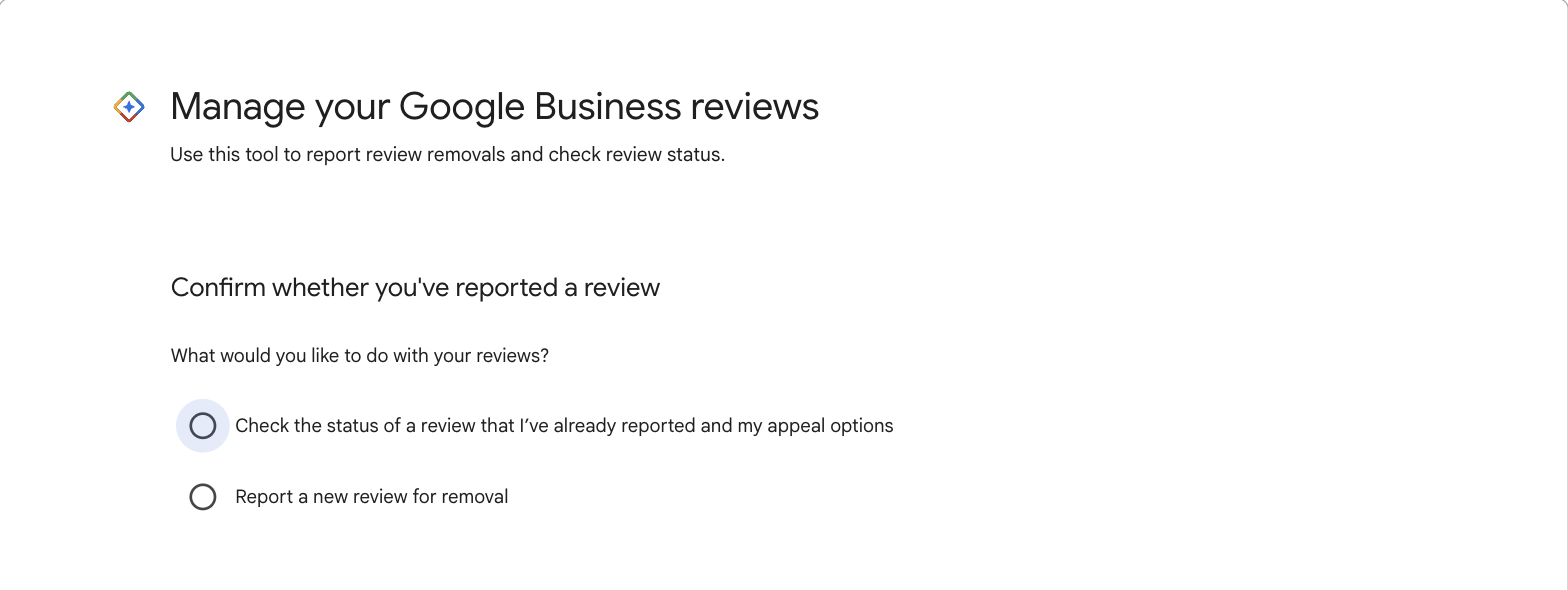
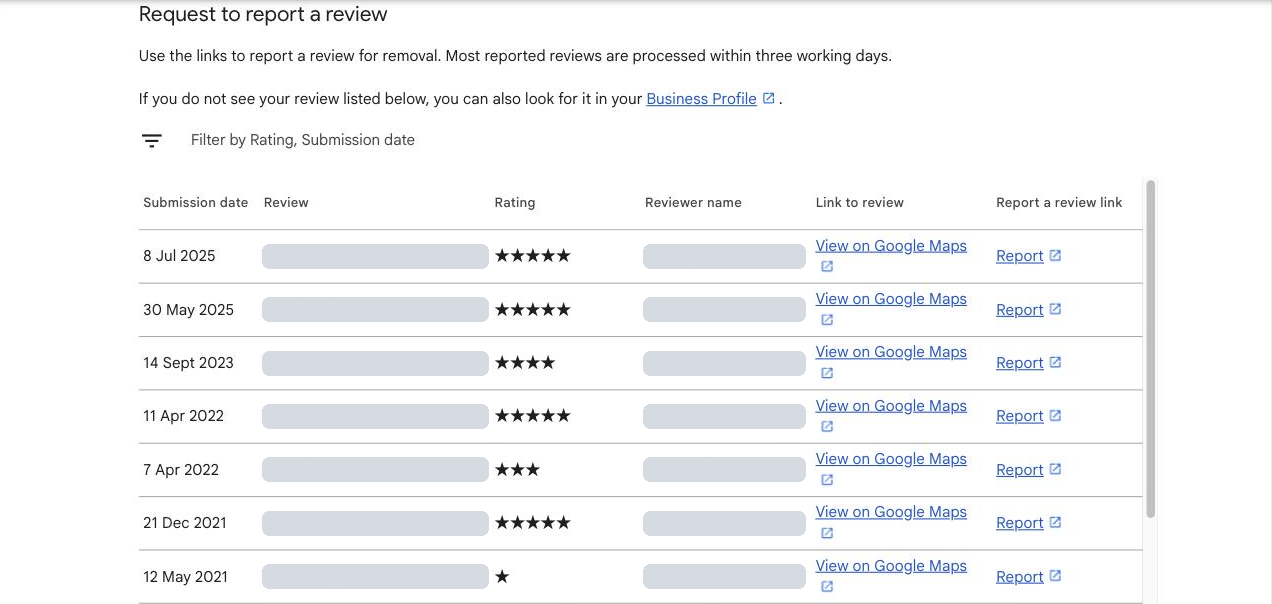
Three things improve your chances:
- Pick the most accurate reason. The person or system assessing the report judges it against the reason you chose.
- Report it once. Reporting the same review repeatedly, or asking friends to report it, doesn't help.
- Keep your evidence. If you appeal later you can explain your case, so note why you believe the reviewer was never a customer, or how they are connected to a competitor.
How long does Google take to remove a review?
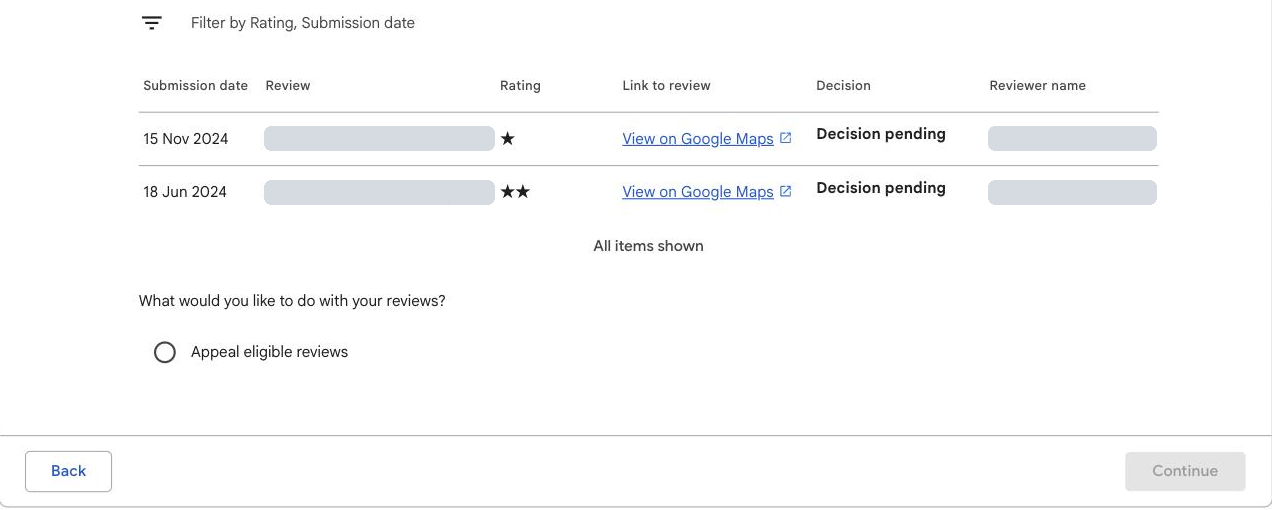
Google says evaluation typically takes several days. You can follow it in the Reviews Management Tool, where each reported review shows one of three statuses:
- Decision pending. Flagged, but not yet assessed.
- Report reviewed, no policy violation. Google looked and decided the review can stay.
- Escalated, check your email for updates. You have appealed and will be emailed the final decision.
If the review is removed, it disappears from Google Search and Maps.
What can you do if Google refuses to remove a review?
You get one appeal per review. In the Reviews Management Tool, choose the option to check the status of a review you reported, select Appeal eligible reviews, pick the review (you can appeal up to 10 at once) and fill in the form. This is where your evidence matters: explain plainly which policy the review breaks and why.
Google emails you the result. If the appeal fails, that is the end of the policy route. What remains is a legal request, which few reviews justify, or a good public reply, which every review deserves.
What about fake reviews and review scams?
Fake reviews break Google's rules, so report them under the closest reason. Two situations need a little more:
- You don't recognise the reviewer. Check your records first; people review under different names. If you genuinely can't match them, report the review and post a short, polite reply saying you can't find them in your records and asking them to get in touch. Don't accuse them of lying. Future customers are reading.
- Someone demands money to stop or remove bad reviews. This is an extortion scam and Google has a separate way to report it, linked from its help page on reporting reviews. Don't pay, and keep every message.
You can also report the reviewer's profile, not only the review, from the Google Maps app if they are leaving the same abuse across several businesses.

Most new customers read your reviews, and your replies, before they call. Photo: Paul Hanaoka / Unsplash
Can you take legal action over a Google review?
Sometimes, but the bar is high. Google has a legal removal request form for content you believe is unlawful, such as defamation, and it tells you to try flagging the review in the normal way first.
In England and Wales, a statement is only defamatory if it has caused, or is likely to cause, serious harm to your reputation. For a business that trades for profit, that means serious financial loss (Defamation Act 2013, section 1). Truth and honest opinion are both defences, so a customer giving their genuine view of a bad experience is very unlikely to be defaming you, however much it stings.
Legal action is slow, expensive and can draw more attention to the review. Take advice from a solicitor before you threaten it. This section is general information, not legal advice.
What should you never do about a bad review?
Some of the tempting shortcuts break Google's rules, UK law or both:
- Don't offer anything to have a review changed or removed. Google's policy bans reviews that are revised or removed in exchange for an incentive. Offering £20 off the next job if the customer takes the review down breaks the rules. Refunding a customer because the job went wrong, without mentioning the review, does not.
- Don't post fake positive reviews to bury it, or ask staff, family or friends to. Fake reviews have been a banned commercial practice in the UK since April 2025 under the Digital Markets, Competition and Consumers Act 2024, enforced by the Competition and Markets Authority (CMA).
- Don't ask only your happy customers for reviews. Google treats selective asking as manipulation. Ask every customer.
- Don't pay for "guaranteed removal". Nobody outside Google can guarantee a review comes down. A removal service can only use the same report and appeal process you can.
- Don't argue in public or reveal private details about the customer in your reply.
The penalties are real. Under undertakings Google gave the CMA in January 2025, a business caught boosting its rating with fake reviews gets a warning alert on its profile and has new reviews switched off, and repeat offenders can have all their reviews deleted for six months or more.
How should you reply to a review you can't remove?
Write the reply for the next customer, not for the reviewer. Someone comparing you with two competitors will read your worst review and your answer to it together. A calm, specific reply often does more for you than the review does against you.
- Reply quickly, ideally within a day or two.
- Thank them and acknowledge the experience, without admitting things that aren't true.
- Keep it short and factual. No sarcasm, no point-scoring.
- Take the detail offline. Give a name and a direct phone number or email.
- Say what you have changed, but only if you really have. Don't claim an investigation or a new procedure that doesn't exist.
- Protect privacy. In healthcare, legal or financial services, don't confirm the reviewer is a patient or client or discuss their case.
Thank you for taking the time to tell us, and I'm sorry we let you down. Arriving late without a phone call isn't the service we aim to give. [If you have looked into it or changed something, say what, briefly and truthfully.] I'd like to put this right for you personally: please call me on [business phone number] or email [business email address]. [Your name], owner.
Adapt it before you use it. This is an illustration, not a template to paste. Fill in the brackets with what actually happened, and leave out anything that isn't true.
Why it works: it apologises for the specific thing, it gives a real person to contact, and it doesn't argue or share anything private.
Google checks replies against its content policies before they appear, usually within 10 minutes, though it can take longer. The reviewer is notified when you reply and can change their review afterwards, which a good reply sometimes prompts.
What did our research find?
We study how UK businesses handle enquiries by reading what their customers say about them in public. The same gap shows up in every sector we look at: critical reviews left without any answer.
Estate and letting agents. Of 958 reviews rated three stars or lower, 667 (70%) had no reply from the agent. 245 of the 676 agents (36%) had reviews but hadn't replied to a single one of their most recent ten, good or bad. Read the estate agent findings.
How we did it: between October and November 2026 we collected up to the 10 most recent Google reviews of each of 676 UK estate and letting agents. 474 agents had ten or more reviews and 202 had fewer, which gave 5,200 reviews in all. Of those, 958 were rated three stars or lower. A review counts as unanswered if it had no owner reply on the day we collected it.
Dental practices. Of 559 one- and two-star reviews, 337 (60%) had no reply from the practice. Read the dental findings.
How we did it: in October 2026 we collected 1,268 public Google reviews of 45 independent dental practices in Birmingham. This was a selected sample weighted towards critical reviews, not every review of each practice. 559 of them were one or two stars, with no more than 30 from any one practice, and the 60% figure is the share of those 559 with no owner reply on the day we collected them.
Most owners search for how to remove a bad review. Far fewer answer the ones they have. Replying is free, takes five minutes, and is the one part of this that is entirely in your hands.
How do you make one bad review matter less?
With more recent, honest reviews. A single one-star review is alarming among eight reviews and barely noticeable among eighty. A customer also trusts a review from last month more than one from three years ago.
The compliant way to get there is simple: ask every customer for an honest review, give them a direct link so it takes one tap, and offer nothing in return. Don't tell them what to write and don't filter who you ask.
Get the free guide to getting Google reviews →Get the free guide: The 7 Keys to Getting Google Reviews That Win You Customers
Twelve pages, seven ten-minute checks: your direct review link, how to ask every customer, how to reply to good and bad reviews, what Google will and won't remove, and a worksheet to compare your reviews with your top three competitors.
Send me the free guide → Free PDF · Scorecard included · No spamFrequently asked questions
Can I delete a Google review of my own business?
No. Only the person who wrote the review can delete it. You can report a review to Google, and Google will remove it if it breaks its content policies.
How do I delete a Google review I wrote?
Open Google Maps, select Menu, then Your contributions, then Reviews. Select More next to the review and choose Delete review or Edit review.
How long does Google take to remove a review?
Google says evaluating a reported review typically takes several days. You can check the status in the Reviews Management Tool.
Will Google remove a review just because it's negative or unfair?
No. Google only removes reviews that break its content policies. A genuine customer describing a bad experience respectfully is allowed, even if you disagree with it.
Can I remove a review from someone who was never a customer?
You can report it. A review that isn't based on a real experience breaks Google's fake engagement policy. Reply politely as well, saying you can't find them in your records and asking them to contact you.
What if Google refuses to remove the review?
You can submit one appeal through the Reviews Management Tool. If that fails, your options are a legal removal request, where the review is unlawful, or a calm public reply.
Can a customer change or delete their own review?
Yes. A reviewer can edit or delete their review at any time from Google Maps. You can ask them to reconsider once you've resolved the problem, but you can't offer anything in return.
Can I pay someone to remove a Google review?
You can pay a firm to report reviews for you, but nobody outside Google can guarantee removal; they use the same report and appeal process you can use free. Paying or rewarding the reviewer to remove or change a review breaks Google's rules.
Is it illegal to post fake reviews in the UK?
Yes. Submitting or commissioning fake reviews has been a banned practice since April 2025 under the Digital Markets, Competition and Consumers Act 2024, enforced by the Competition and Markets Authority.
Sources: Google Business Profile Help, Report inappropriate reviews on your Business Profile and Manage customer reviews; Google Maps Prohibited and restricted content policy and Add, edit or delete Google Maps reviews and ratings; Google Report content for legal reasons; CMA, CMA secures important changes from Google to tackle fake reviews (24 January 2025) and Fake reviews guidance (CMA208); Defamation Act 2013, section 1. All checked 20 November 2026. Review figures are from Assist's review of 676 UK estate and letting agents (October–November 2026) and of 45 Birmingham dental practices (October 2026). This article is general information, not legal advice.


